<?xml version="1.0" encoding="UTF-8"?>
<feed xml:lang="ja" xmlns="http://www.w3.org/2005/Atom">
	<title>Mobile Dev. (Android + Java)</title>
	<subtitle>Mobile Application 開発メモ（主にAndroid）</subtitle>
	<id>http://labs.karappo.net/mobiledev:10</id>

	<link rel="alternate" type="text/html" href="http://labs.karappo.net/mobiledev" />
	<link rel="self" type="application/atom+xml" href="http://labs.karappo.net/mobiledevatom.php" />
	<generator uri="http://nucleuscms.org/">Nucleus CMS v3.71</generator>
	<updated>2012-01-19T15:31:24Z</updated>

	<entry>
 <title type="html"><![CDATA[EclipseのPhoneGap Plugin でエラー]]></title>
 <link rel="alternate" type="text/html" href="atom.php?itemid=294" />
 <author>
  <name>terada</name>
 </author>
 <updated>2012-01-19T15:31:24Z</updated>
 <published>2012-01-20T00:31:24+09:00</published>
 <content type="html"><![CDATA[<b>Phonegap Plaguin</b><br />
<pre class="code">https://svn.codespot.com/a/eclipselabs.org/mobile-web-development-with-phonegap/tags/r1.2.5/download</pre><br />
※ 最新版は<a href="https://svn.codespot.com/a/eclipselabs.org/mobile-web-development-with-phonegap/tags/">こちら</a>から確認してください。<br />
<br />
Help > Install New Software からWork withの項目に上記を入力してEclipseのPhoneGap Pluginをインストールしようとしたところ、エラーが出てしまいました。<br />
<pre class="code">An error occurred while collecting items to be installed<br />
session context was:(profile=epp.package.java, phase=org.eclipse.equinox.internal.p2.engine.phases.Collect, operand=, action=).<br />
Problems downloading artifact: osgi.bundle,org.mozilla.javascript,1.7.2.v201005080400.<br />
MD5 hash is not as expected. Expected: 8785860e8f2a2a43fe10dd8b9eb334b6 and found 7ab8a5d6da46b081c83bfc81e7c880e6.</pre><br />
<br />
<br />
MDS AppLaud には<br />
JavaScript Development Tools<br />
jQuery Mobile License<br />
jslint4java<br />
PhoneGap License<br />
PhonegapForAndroid<br />
の５項目が含まれていて、一番上のJSDTで問題が発生しているようだったので、その下の４つを１つずつ上から順番に（一度に４つだと何故か駄目でした）インストールして行くと、最終的にPluginのボタンがIDE上に表示されて、新規プロジェクトの作成もすることができました。<br />
<br />
※ EclipseはIndigoで確認しました。Galileoでは上の方法でも駄目でした…。]]></content>
 <id>http://labs.karappo.net/mobiledev:10:294</id>
</entry><entry>
 <title type="html"><![CDATA[Titanium Studioで作成したプロジェクトを実機にインストールする]]></title>
 <link rel="alternate" type="text/html" href="atom.php?itemid=289" />
 <author>
  <name>terada</name>
 </author>
 <updated>2011-11-29T15:43:54Z</updated>
 <published>2011-11-30T00:43:54+09:00</published>
 <content type="html"><![CDATA[Titanium StudioはAptanaベースの（ということはEclipseベースなのですが）開発環境です。<br />
ちょっと試してみようと思って、作成したアプリケーションを実機にインストールする方法が分かりにくかったのでメモしておきます。<br />
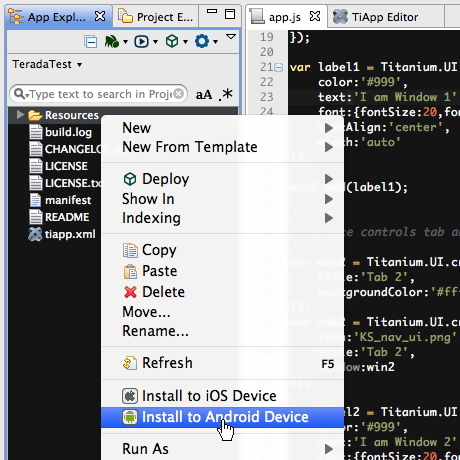
いつも通りにデバッグ可能にしているAndroid端末を接続し、普通にRun（もしくはDebug）するとエミュレーターしか選択できません。おや？と思って、adb devicesとしてみてるとちゃんと認識されている。RunConfigurationとか調べてみたのですが、設定できず。おかしいなぁと思ったら、「App Exploler」というTitaniumのプロジェクト管理用のViewで、プロジェクトを選択して右クリックすると、コンテクストメニューの中に「Install to Android Device」というのがあり、これ選択してやると実機にインストールすることができました。<br />
<br />
<img src="http://labs.karappo.net/media/1/20111130-titanium.png" width="460" height="460" alt="" title="" /><br />
<br />
ただし、アプリは勝手に立ち上がらないので、コンソールに「Application installed. Launch from drawer on Home Screen」と出たら、自分でアプリケーションメニューを開いて、インストールされているアプリを起動しなくては行けません。（何気に面倒・・・）<br />
それに、デバッグもできなさそうでした。<a href="http://developer.appcelerator.com/blog/2011/06/titanium-studio%E3%81%A8titanium-mobile-1-7%E3%82%92%E3%83%AA%E3%83%AA%E3%83%BC%E3%82%B9%E3%81%97%E3%81%BE%E3%81%97%E3%81%9F.html?lang=ja">ここのサイト</a>によると、「Titanium Community &#8211; 無料 &#8211; iOSとAndroidに対応したTitanium mobile SDKと、Titanium Studioで、モバイルデバイスのデバッグを除く全ての機能が使えます。」とあるので、無理くりなんとかしようとしても駄目なのかな？]]></content>
 <id>http://labs.karappo.net/mobiledev:10:289</id>
</entry><entry>
 <title type="html"><![CDATA[Unable to launch app ... が出たら端末を再起動]]></title>
 <link rel="alternate" type="text/html" href="atom.php?itemid=276" />
 <author>
  <name>terada</name>
 </author>
 <updated>2011-05-27T02:07:23Z</updated>
 <published>2011-05-27T11:07:23+09:00</published>
 <content type="html"><![CDATA[覚え書きです。<br />
AppWidgetを作成中、「Unable to launch app ... process is bad」というようなエラーが出て、AppWidgetProviderもServiceも起動しなくなってしまいました。マニフェストXMLを編集したりいろいろやってみましたが、「アプリを一旦削除　→　端末を再起動」で解決しました。]]></content>
 <id>http://labs.karappo.net/mobiledev:10:276</id>
</entry><entry>
 <title type="html"><![CDATA[【コピペ用】onMeasure内で幅や高さの実際値を取得]]></title>
 <link rel="alternate" type="text/html" href="atom.php?itemid=275" />
 <author>
  <name>terada</name>
 </author>
 <updated>2011-05-10T17:18:19Z</updated>
 <published>2011-05-11T02:18:19+09:00</published>
 <content type="html"><![CDATA[ViewのonMeasure内でwidthやheightの実際の値を取得する方法のコピペ用覚え書きです。MeasureSpec.getSizeを使います。<br />
<pre class="code">@Override<br />
protected void onMeasure(int widthMeasureSpec,int heightMeasureSpec)<br />
{<br />
    super.onMeasure(widthMeasureSpec, heightMeasureSpec);<br />
    int width = MeasureSpec.getSize(widthMeasureSpec);<br />
    int height = MeasureSpec.getSize(heightMeasureSpec);<br />
}</pre>]]></content>
 <id>http://labs.karappo.net/mobiledev:10:275</id>
</entry><entry>
 <title type="html"><![CDATA[【コピペ用】ボタンのセレクターのXML]]></title>
 <link rel="alternate" type="text/html" href="atom.php?itemid=273" />
 <author>
  <name>terada</name>
 </author>
 <updated>2011-04-26T11:59:30Z</updated>
 <published>2011-04-26T20:59:30+09:00</published>
 <content type="html"><![CDATA[ボタンのセレクターXML、いつもどうやって書くのか忘れてしまうので覚え書きです。いろいろ指定の仕方はあるみたいですが、ものによっては思ったような動作しなかったで、自分用ってことで。<br />
<br />
<pre class="code">&lt;?xml version="1.0" encoding="UTF-8"?&gt;<br />
&lt;selector xmlns:android="http://schemas.android.com/apk/res/android"&gt;<br />
<br />
	&lt;!-- 通常 --&gt;<br />
	&lt;item<br />
		android:state_enabled="true"<br />
		android:state_window_focused="false"<br />
		android:drawable="@drawable/button_background_normal" /&gt;<br />
	&lt;!-- 無効 --&gt;<br />
	&lt;item<br />
		android:state_enabled="false"<br />
		android:state_window_focused="false"<br />
		android:drawable="@drawable/button_background_disable" /&gt;<br />
	&lt;!-- 押下 --&gt;<br />
	&lt;item<br />
		android:state_pressed="true"<br />
		android:drawable="@drawable/button_background_pressed" /&gt;<br />
	&lt;!-- フォーカス --&gt;<br />
	&lt;item<br />
		android:state_focused="true"<br />
		android:state_enabled="true"<br />
		android:drawable="@drawable/button_background_focused" /&gt;<br />
	&lt;!-- 通常 --&gt;<br />
	&lt;item<br />
		android:state_enabled="true"<br />
		android:drawable="@drawable/button_background_normal" /&gt;<br />
	&lt;!-- 無効、フォーカス --&gt;<br />
	&lt;item<br />
		android:state_focused="true"<br />
		android:drawable="@drawable/button_background_disable_focused" /&gt;<br />
&lt;/selector&gt;</pre><br />
<br />
「btn_selector.xml」とかの名前にしてdrawableフォルダに格納。]]></content>
 <id>http://labs.karappo.net/mobiledev:10:273</id>
</entry><entry>
 <title type="html"><![CDATA[a2sd対応したアプリをマーケットで公開するときの注意点]]></title>
 <link rel="alternate" type="text/html" href="atom.php?itemid=269" />
 <author>
  <name>terada</name>
 </author>
 <updated>2011-02-07T02:27:02Z</updated>
 <published>2011-02-07T11:27:02+09:00</published>
 <content type="html"><![CDATA[a2sd（アプリをSDカードに保存可能にする機能）対応する方法ですが、ビルドまでに必要な手順は以下の2(3)ステップです。<br />
<br />
・ビルドターゲットを2.2にする<br />
・マニフェストファイルでinstallLocationを設定<br />
<pre class="code">&lt;manifest <br />
     xmlns:android="http://schemas.android.com/apk/res/android"<br />
     android:installLocation="auto"<br />
     ... /&gt;</pre><br />
（↓2.2より以前のOSでも一応インストールできるようにしたい場合。ただし、a2sd以外のSDK8以降の機能は使わないように気をつける）<br />
・android:minSdkVersionは8にせず、任意のバージョンに設定<br />
<br />
ただし！！<br />
そのアプリをマーケットで公開したい場合は、もう1つ注意点があります。<br />
<br />
<b>・マーケットのデベロッパーコンソールの「公開設定のオプション」で「コピー防止」をオフにする</b><br />
<img src="http://labs.karappo.net/media/1/20110207-copyprotect.png" width="796" height="116" alt="コピー防止をオフに" title="コピー防止をオフに" /><br />
<br />
コピー防止をオンのまま公開すると、インストールはできても「設定＞アプリケーション＞アプリケーションの管理」から「SDカードに移動」ボタンが無効のままで効果がありません！<br />
<br />
<a href="http://android-developers.blogspot.com/2010/07/apps-on-sd-card-details.html">Apps on SD Card: The Details</a><br />
↑「Security and Performance Implications」のところを参照]]></content>
 <id>http://labs.karappo.net/mobiledev:10:269</id>
</entry><entry>
 <title type="html"><![CDATA[Eclipseの検索ボックスで終点までいったら始点に戻るようにする]]></title>
 <link rel="alternate" type="text/html" href="atom.php?itemid=260" />
 <author>
  <name>terada</name>
 </author>
 <updated>2010-12-01T18:25:40Z</updated>
 <published>2010-12-02T03:25:40+09:00</published>
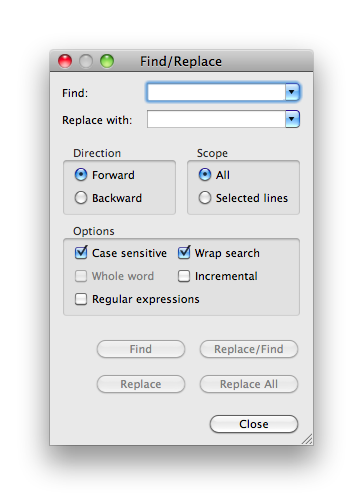
 <content type="html"><![CDATA[細かいチップスですが、下記のようにFind/Replaceボックスのoptionsの「Wrap search」のチェックボックスを有効にすると、FIndボタンを連続でクリックして検索のインデックスが終点（もしくは始点）まで行ったときに、そのまま始点（もしくは終点）に折り返して検索を続けることが出来ました。<br />
<br />
今まで知らなくて、終点まで行ったら行き止まりだったのでDirectionをいちいち切り替えたりしちゃってました・・・。<br />
最近Xcodeもたまにいじるのですが、Eclipseの方が断然使いやすい印象です。慣れてなくて細かい機能を知らないうちはイライラしてましたが、やはり大変優秀な開発環境だと思い直しました。<br />
<br />
<img src="http://labs.karappo.net/media/1/20101202-search.png" width="362" height="502" alt="検索ボックス" title="検索ボックス" /><br />
]]></content>
 <id>http://labs.karappo.net/mobiledev:10:260</id>
</entry><entry>
 <title type="html"><![CDATA[startActivityForResultでBluetoothAdapter.ACTION_REQUEST_DISCOVERABLEを呼び出すときの注意点]]></title>
 <link rel="alternate" type="text/html" href="atom.php?itemid=259" />
 <author>
  <name>terada</name>
 </author>
 <updated>2010-11-24T04:55:08Z</updated>
 <published>2010-11-24T13:55:08+09:00</published>
 <content type="html"><![CDATA[startActivityForResultを使ってBluetoothAdapter.ACTION_REQUEST_DISCOVERABLEを呼び出す際のonActivityResult内での判定の仕方が特殊だったのでメモ。<br />
<br />
<pre class="code">private static final int REQUEST_DISCOVERABLE = 1;<br />
private static final int DURATION = 300; // 持続期間<br />
<br />
Intent discoverableIntent = <br />
    new Intent(BluetoothAdapter.ACTION_REQUEST_DISCOVERABLE);<br />
discoverableIntent.putExtra(BluetoothAdapter.EXTRA_DISCOVERABLE_DURATION, DURATION);<br />
startActivityForResult(discoverableIntent,REQUEST_DISCOVERABLE);<br />
<br />
public void onActivityResult(int requestCode, int resultCode, Intent data) <br />
{<br />
    switch (requestCode) <br />
    {<br />
    case REQUEST_DISCOVERABLE:<br />
        <span style="color:red;">//成功時のresultCodeは「Activity.RESULT_OK」ではなく、持続期間の秒数になる。<br />
        //拒否された場合は0になる。</span><br />
        if (resultCode==DURATION) <br />
        {<br />
            // result ok ...<br />
        }<br />
        else<br />
        {<br />
            // result cancel ....<br />
        }<br />
        break;<br />
    default :<br />
        break;<br />
    }<br />
}</pre>]]></content>
 <id>http://labs.karappo.net/mobiledev:10:259</id>
</entry><entry>
 <title type="html"><![CDATA[Cursorの走査]]></title>
 <link rel="alternate" type="text/html" href="atom.php?itemid=253" />
 <author>
  <name>terada</name>
 </author>
 <updated>2010-11-17T04:05:45Z</updated>
 <published>2010-11-17T13:05:45+09:00</published>
 <content type="html"><![CDATA[初歩的で申し訳ありませんが、Cursorオブジェクトの中身を全部走査する方法。<br />
他にも考えられるけど、実行速度的にはこの二つが速い様子。（paternAの方が若干速いかも？？）<br />
<br />
<pre class="code">// paternA <br />
Cursor curA = getCursor();<br />
int a = 0;<br />
for(int i=0; i&lt;curA.getCount();i++)<br />
{<br />
	curA.moveToPosition(i);<br />
	a++;<br />
}<br />
if(curA!=null) curA.close();<br />
<br />
// paternB <br />
Cursor curB = getCursor();<br />
int b = 0;<br />
// curB.moveToNext();   // ←あってもなくても一緒みたい<br />
while(curB.moveToNext())<br />
{<br />
	b++;<br />
}<br />
if(curB!=null) curB.close();</pre><br />
<br />
以上。]]></content>
 <id>http://labs.karappo.net/mobiledev:10:253</id>
</entry><entry>
 <title type="html"><![CDATA[HTC Desireでアプリアップデートの際に起動アクティビティを変更するとランチャーから起動できなくなる]]></title>
 <link rel="alternate" type="text/html" href="atom.php?itemid=251" />
 <author>
  <name>terada</name>
 </author>
 <updated>2010-11-11T07:39:10Z</updated>
 <published>2010-11-11T16:39:10+09:00</published>
 <content type="html"><![CDATA[結局解決していない問題ですが、備忘録として。<br />
<br />
HTC Desire（OS2.2）でアプリアップデートの際に起動アクティビティを変更するとランチャーから起動できなくなる現象に遭遇しました。<br />
<br />
状況としては、<br />
<br />
以下のようなマニフェストXMLのアプリを一旦端末にインストールする。<br />
<pre class="code">&lt;activity android:name=".ActivityA"&gt; <br />
        &lt;intent-filter&gt; <br />
                &lt;action android:name="android.intent.action.MAIN" /&gt; <br />
                &lt;category android:name="android.intent.category.LAUNCHER" /&gt; <br />
        &lt;/intent-filter&gt; <br />
&lt;/activity&gt; <br />
&lt;activity android:name=".ActivityB"&gt; <br />
&lt;/activity&gt;</pre><br />
次に、起動時のアクティビティを変更すべくマニフェストXMLを下記のように変更しインストール。<br />
<pre class="code">&lt;activity android:name=".ActivityA"&gt; <br />
&lt;/activity&gt; <br />
&lt;activity android:name=".ActivityB"&gt; <br />
    &lt;intent-filter&gt; <br />
        &lt;action android:name="android.intent.action.MAIN" /&gt; <br />
        &lt;category android:name="android.intent.category.LAUNCHER" /&gt; <br />
    &lt;/intent-filter&gt; <br />
&lt;/activity&gt;</pre><br />
すると、ホーム画面やアプリ一覧画面上のランチャー（アプリのアイコン）から起動できなくなる。<br />
（「リンクしたプログラムは電話にインストールされていません」というメッセージが表示される）<br />
<br />
開発中のアプリであれば、一度アンインストールすれば良いのですが、公開中のアプリでDBをつかっているなど、アンインストールされるとまずい場合に厄介です。<br />
<br />
もちろん、ホーム画面のリンクが切れるのは納得いくのですが（これは単に静的なエイリアスだと思うので）、アプリ一覧の中のランチャーが更新されていないのが解せません。android.intent.action.MAINできちんと呼ばれていないのか？？<br />
<br />
※　下記の端末では、問題なくランチャーも更新されていました。<br />
Motorola Milestone XT720（OS2.1update1）<br />
Sonny Ericsson Xperia X10（OS2.1update1）<br />
Google NexusOne（OS2.2）<br />
※　マーケットからやるとどうなるかは試していません。<br />
※　versionCodeを増やしてもだめでした。]]></content>
 <id>http://labs.karappo.net/mobiledev:10:251</id>
</entry>
</feed>